Java Installation
Step 1: JDK installation
You can download JDK from Oracle Technical Network
(OTN) Link
We have two choices to install JDK on a Linux platform:
1. Common for any Linux platform: tar.gz file
tar -zxvf /u01/app/software/jdk*.gz
2. To install WebLogic Server in silent mode installation first we have to install JDK in the Ubuntu.The alternative in the Ubuntu box as follows:
sudo add-apt-repository ppa:webupd8team/java
sudo apt-get update
sudo apt-get install oracle-java7-installer
Step 2: Setup the Environment variables in file called .bash_profile, assume that your login shell is bash. Modify the JAVA_HOME, MW_HOME according to your installations.
export JAVA_HOME=/usr/lib/jvm/java-7-oracle
export PATH=$PATH:$JAVA_HOME/bin
export MW_HOME=/u01/app/oracle/fmw/oraclehome
export WL_HOME=$MW_HOME/wlserver
export CLASSPATH=$WL_HOME/server/lib/weblogic.jar:.

alias wlst="$MW_HOME/oracle_common/common/bin/wlst.sh"
Step 3:Download WebLogic server 12.1.3 Generic file from
download link.
Steps involved in silent mode installation
Step 4: Create a directory “silent” and copy the wls.jar file to this directory. mkdir silent
Step 6: Create a file oraInst.loc file in silent directory as follows as: vi oraInst.loc And insert inventory location and installation group as follow as
Inventory_loc=/u01/app/oracle/silent/oraInventory/
Inst_group=oinstall
Step 7: Create a response file and insert below things in the response file
[ENGINE]
Response File Version=1.0.0.0.0
[GENERIC]
ORACLE_HOME=/u01/app/oracle/fmw
INSTALL_TYPE=WebLogic Server
DECLINE_SECURITY_UPDATES=true
SECURITY_UPDATES_VIA_MYORACLESUPPORT=false
You could edit the ORACLE_HOME as you change versions and also
There could be multiple options for INSTALLATION_TYPE:
- WebLogic Server
- Coherence
- Complete with Examples
- Fusion Middleware Infrastructure [Infrastructure domains]
- Fusion Middleware Infrastructure with Examples [for Restricted JRF, EM domains]
Step 7: Go to the wls.jar location ie in the silent directory and insert the following command
java -jar /u01/app/software/fmw_12*_wls.jar \
-silent -invPtrLoc /u01/app/oracle/silent/oraInst.loc \
-responseFile /u01/app/oracle/silent/responsefile.rsp
Step 8: Check WebLogic server is installed in mention location or not
Conclusion
Easy once you worked on this procedure you can work on SOA, OSB, ADF and any Oracle Fusion Middleware products.
The above work is for 12.1.3 version which is an older version of 12c!
WebLogic 12.2.1.x installation in silent mode
The latest version of 12c is 12.2.1.0.0 lets enjoy the new features of WebLogic on Vagrant box here I have executed the installer without matching the certificate matrix. So two of them are not satisfied
- Ubuntu Linux
- JDK 1.8.0_51 is expected provided 1.8.0_45
WHAT IS NOT INCLUDED IN THE QUICK INSTALLER?
- Native JNI libraries for unsupported platforms.
- Samples, non-English console help (can be added by using the WLS supplemental Quick Install)
- Oracle Configuration Manager (OCM) is not included in the Quick installer
- SCA is not included in the Quick Installer
[Source extracted from README.txt file]
To install the Quick installer use the following command:
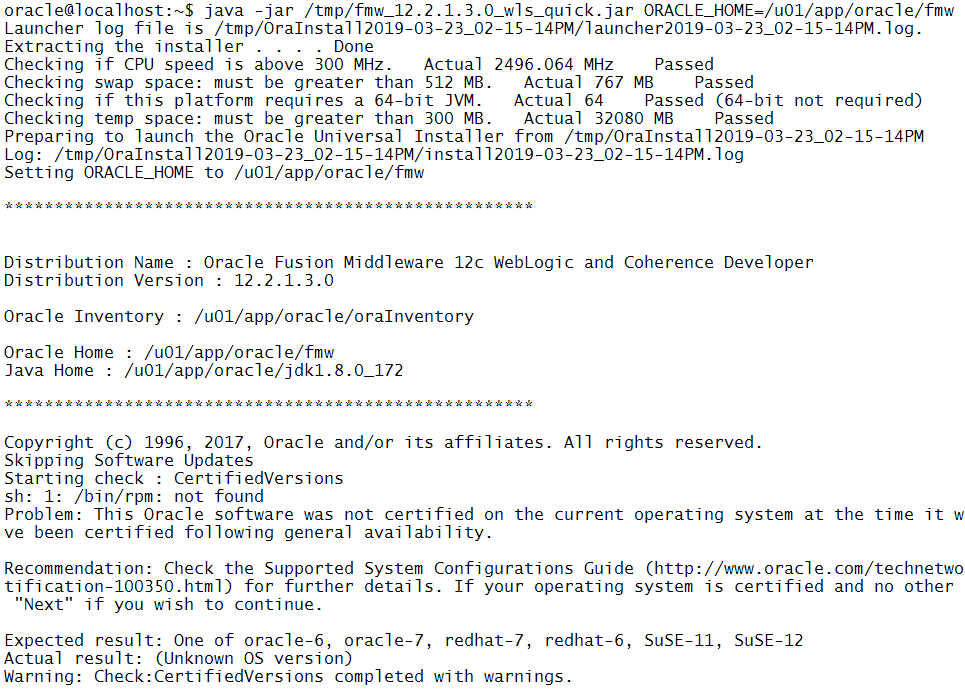
java -jar fmw_12.2.1.3.0_wls_quick.jar ORACLE_HOME=/u01/app/oracle/fmw
The output of Quick install command:
To install the generic installer use the following command:
oracle@mydev:/u01/app/software$ java -jar fmw_12*_wls.jar -silent -invPtrLoc /home/oracle/silent/oraInst.loc -response /home/oracle/silent/responsefile.rsp
Launcher log file is /tmp/OraInstall2015-10-30_01-30-57AM/launcher2015-10-30_01-30-57AM.log.
Option "-response" is deprecated; use "-responseFile" instead.
Extracting files................................
Starting Oracle Universal Installer

Checking if CPU speed is above 300 MHz.   Actual 2592.418 MHz    Passed
Checking swap space: must be greater than 512 MB.   Actual 767 MB    Passed
Checking if this platform requires a 64-bit JVM.   Actual 64    Passed (64-bit not required)
Checking temp space: must be greater than 300 MB.   Actual 72517 MB    Passed


Preparing to launch the Oracle Universal Installer from /tmp/OraInstall2015-10-30_01-30-57AM
Log: /tmp/OraInstall2015-10-30_01-30-57AM/install2015-10-30_01-30-57AM.log
Copyright (c) 1996, 2015, Oracle and/or its affiliates. All rights reserved.
Reading response file..
Skipping Software Updates
SEVERE:OUI-10054:Unable to modify the group ownership of the OUI inventory to the requested group name "vagrant". Either the specified group doesnt exist, or the current userid does not belong to that group. If the group exists, you may run the shell script {1} as root to change the group name after installation is complete.
Starting check : CertifiedVersions
sh: 1: /bin/rpm: not found
Check complete. The overall result of this check is: Not executed <<<<
Warning: Check:CertifiedVersions completed with warnings.


Starting check : CheckJDKVersion
Problem: This JDK version was not certified at the time it was made generally available. It may have been certified following general availability.

Recommendation: Check the Supported System Configurations Guide (http://www.oracle.com/technetwork/middleware/ias/downloads/fusion-certification-100350.html) for further details. Press "Next" if you wish to continue.

Expected result: 1.8.0_51
Actual result: 1.8.0_45
Warning: Check:CheckJDKVersion completed with warnings.


Validations are enabled for this session.
Verifying data
Copying Files

...............................................................  38% Done.
...............................................................  76% Done.
.....
Installation in progress (Friday, October 30, 2015 1:32:39 AM UTC)
                                                            79% Done.
Install successful

Linking in progress (Friday, October 30, 2015 1:33:07 AM UTC)
Link successful

Setup in progress (Friday, October 30, 2015 1:33:07 AM UTC)
Setup successful

Saving inventory (Friday, October 30, 2015 1:33:08 AM UTC)
Saving inventory complete

End of install phases.(Friday, October 30, 2015 1:33:08 AM UTC)
Percent Complete : 100

The installation of Oracle Fusion Middleware 12c WebLogic Server and Coherence 12.2.1.0.0 completed successfully.
Logs successfully copied to /home/oracle/oraInventory/logs.
oracle@mydev:/u01/app/software$
Troubleshoot installation issues
Issue 1: Qucick installation time got the following error
oracle@localhost:~$ java -jar fmw_12.2.1.3.0_wls_quick.jar ORACLE_HOME=/u01/app/oracle/fmw
Error: Unable to access jarfile fmw_12.2.1.3.0_wls_quick.jar
Fix: Check the the path where the "fmw_12.2.1.3.0_wls_quick.jar" available, navigate to the path or provide absolute path.
* Quiz time
When installing Oracle Weblogic Server 11g with the graphical installer, which three statements are true?
A. You must choose either a typical or a custom installation.
B. You install under Microsoft Windows because the graphical installer is available only for Window C. You may create a new middleware home directory or choose an existing one.
D. You must register for critical security updates.
E. You may install a JDK or choose one that was previously installed.